
Welcome to our guide on how to install Kali Linux 2024 on your physical PC. Lots of people care about keeping their computers safe, like using this OS. It has free tools that can help you check if your device is secure from hackers.
Whether you’re studying cybersecurity, testing PC security, or just interested in ethical hacking, Kali OS is a great choice. In this guide, we’ll show you every step to get this distribution on your computer. Then, you can start testing and protecting your systems right away.

Explore and Install Kali Linux: The Strong Tool for Hacking and Keeping Your Computer Safe
Kali Linux is an excellent computer system made by a company called Offensive Security. It’s really popular with people who want to learn about hacking or make their computers safer.
Many people like it because it has many tools to help keep things secure. It’s also easy to use, which is excellent for beginners and experts.
Compared to other systems like Ubuntu, Kali is really good at keeping things safe. That’s important if you want to keep your stuff private and secure. If you’re curious about hacking or want to be better at keeping your PC safe, it might be what you need.
What Tools in Kali Linux Help Keep Your PC Safe?
Kali Linux has lots of tools to keep your computer secure. Here are some:
- Nmap: It finds weaknesses in your network.
- Metasploit: It tests how robust your security is by pretending to attack.
- Wireshark: It helps fix network issues by analyzing data.
- Aircrack-ng: It checks if Wi-Fi passwords are strong enough.
- John the Ripper: It finds weak passwords on your computer.
- OpenVAS: It finds problems in your system and tells you how to fix them.
- Maltego: It gathers info about targets to find weak spots.
These tools in this Linux help stop hackers and keep your computer safe.
What are The System Requirements for Installing Kali?
To install Kali Linux on a PC, your system must meet the following requirements:
- Processor: The processor must be a 64-bit system, and it should be an Intel i3/i5/i7 or AMD equivalent.
- Memory: You will need at least 2GB of RAM for a smooth setup, but it’s recommended to have 4GB or more for a better experience.
- Storage: You will need at least 20GB of free disk space to install Kali Linux.
- Graphics: A graphics card that supports OpenGL 3.3 or higher is required. If you have an older graphics card, you may experience performance issues.
- Network: It requires an internet connection for updates and to download additional tools.
It’s important to note that these are just the minimum requirements. For better performance, it’s recommended to have a more powerful hardware configuration.
What Desktop Designs Can You Choose From in Kali Linux?
There are different looks you can pick, called desktop environments, to install Kali Linux on a PC. Each one has its own style and tools. You see the desktop environment when you start up it. Here are some options:
- GNOME: This is the default look in this distribution. It’s easy to use and looks modern. It comes with lots of helpful apps for security stuff.
- KDE Plasma: This one is really flexible and can be changed a lot. It’s known for being fast and reliable. Good if you like lots of options.
- Xfce: This one is light and speedy. It’s great if your computer is older or you want something simple. You can also tweak it a bunch.
- MATE: MATE is classic and based on an older style. It’s quick, stable, and straightforward. Good if you like things familiar.
- LXDE: LXDE is super light and perfect for older computers or if you want something fast. You can also switch it up to suit you.
These are the primary desktop environments in Kali Linux. Each one has its excellent features, so pick the one that fits you best!
Installing Kali Linux on a PC with Flash Memory
If you want to put this distribution on your host, you can watch our video or read a guide that shows you each step. It may seem tricky, but with the right help, you’ll get it on your PC smoothly.
- If you want to get the Kali Linux ISO file, first go to their website using the link they gave you. Once you’re there, click the Download button you see on the main page.
- When you see the download options, pick “Bare Metal” and then click the download button next to “Kali Linux 2024”. This starts the download, and you can save the file on your computer.
- After you’ve got its ISO, you need to get a program called Rufus from the link they provided and put it on your computer. Then, stick a USB drive into your computer and open Rufus. Click on SELECT to add the Kali file you downloaded.
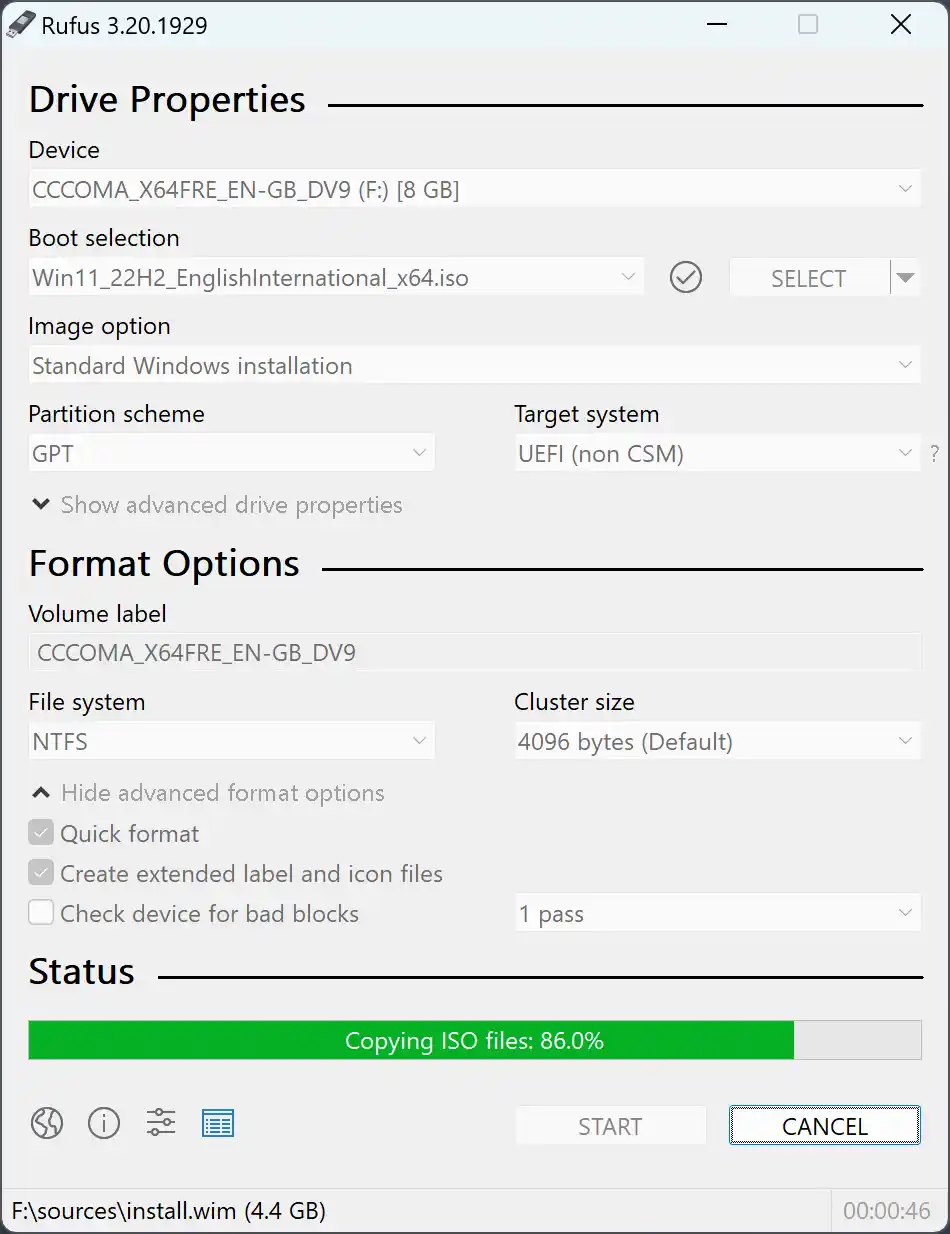
Credit: Rufus
- Now, hit the START button, and Rufus will put it on your USB drive. This makes a special USB stick that can install Kali on your computer.
- Once your USB stick is ready, plug it into your computer and restart it. While your computer is starting up, open the Boot Menu and pick the option to boot from your USB.
- When the Kali Boot Menu shows up, choose Graphical Install and press Enter. Then, pick your language and country. Next, select your keyboard layout.
- On the screen to set up your network, give your system a name and skip typing a domain name. Type your full name on the Set Up Users and Passwords screen. Then, type a username in lowercase letters on the next screen. Make a strong password and pick your time zone.
- On the Partition Disks screen, choose the “Guided – Use Entire Disk” option and pick the disk where you want to deploy it. Then, select “All Files In One Partition” and press Enter to finish setting up the disk.
- Say Yes to make the changes to the disk, and then pick your favorite desktop on the Software Selection screen. Finally, confirm that you want to load the GRUB Boot Loader and restart your computer.
- After you finish setting up Kali Linux on your computer, you can start using it. To get into your account, use the username and password you made when you installed it.
How Long Does It Take to Install Kali Linux using USB?
The time it takes to establish it on a PC can change depending on a few things. This includes how fast your PC is, how you’re installing it, and how much you know about putting stuff on computers. Usually, it takes about 30 to 45 minutes for a basic installation.
But, if you’re using a USB drive to run it, it might take longer because USB drives can be slower. If you use a DVD instead, it might be faster because DVDs are usually quicker.
Also, if you’re installing it alongside another operating system, like Windows, it could take longer. This is because you have to split up the hard drive and set up both systems, which can take extra time.
So, it can vary, but deploying Kali Linux takes about 30 to 45 minutes.
Conclusion
In short, it’s easy to put Kali Linux 2024 on a regular computer or laptop. Just do what we explained in this article. So, it is strong and often used to test how safe PC systems are.
With our help, you can set up Kali OS and try all its excellent features. Whether you’re new to this or you already know a lot, it is fantastic for learning about cybersecurity and ethical hacking.
If you want to know about different types of Linux and how to run them on your PC, look at our guide on how to install Debian. It’s a good option if you want a trustworthy, safe, and flexible OS that’s free to use. Our guide will show you every step, from getting its file to setting up your device after it’s installed.